Filing an income tax return is not the end of the process of filing an ITR. After filing an ITR online, it is important that you verify the ITR before your return is processed.
E-verification is the simplest method by which you can verify that the ITR has been filed by you and this can also be done online without submitting an actual copy of ITR-V. For individuals who are filing ITRs for financial year AY 2026-27, there are different ways to electronically verify your ITR provided by the Income Tax Department which include Aadhaar OTP, bank account EVC, demat account EVC, net banking and DSC.
This article will help you understand the process of ITR e-verification online.
What Is ITR E-Verification?
Verification of ITR through the electronic mode implies the process of establishing the identity of the individual who has submitted the income tax return.
There is a difference between filing and verification. In case the ITR has been filed through the internet, then the return is filed, but it has to be verified through one of the methods which are accepted.
Why Do You Need to E-Verify Your ITR?
The verification helps to prove that the taxpayer has signed the e-Filing return successfully. The process of verification is quite significant when completing the filing of the ITR.
If the taxpayer fails to verify the e-filed return before the end of the deadline, then the return may not be considered as a duly filed ITR from the relevant date. Thus, taxpayers need to complete the process of verification immediately after filing their ITR.
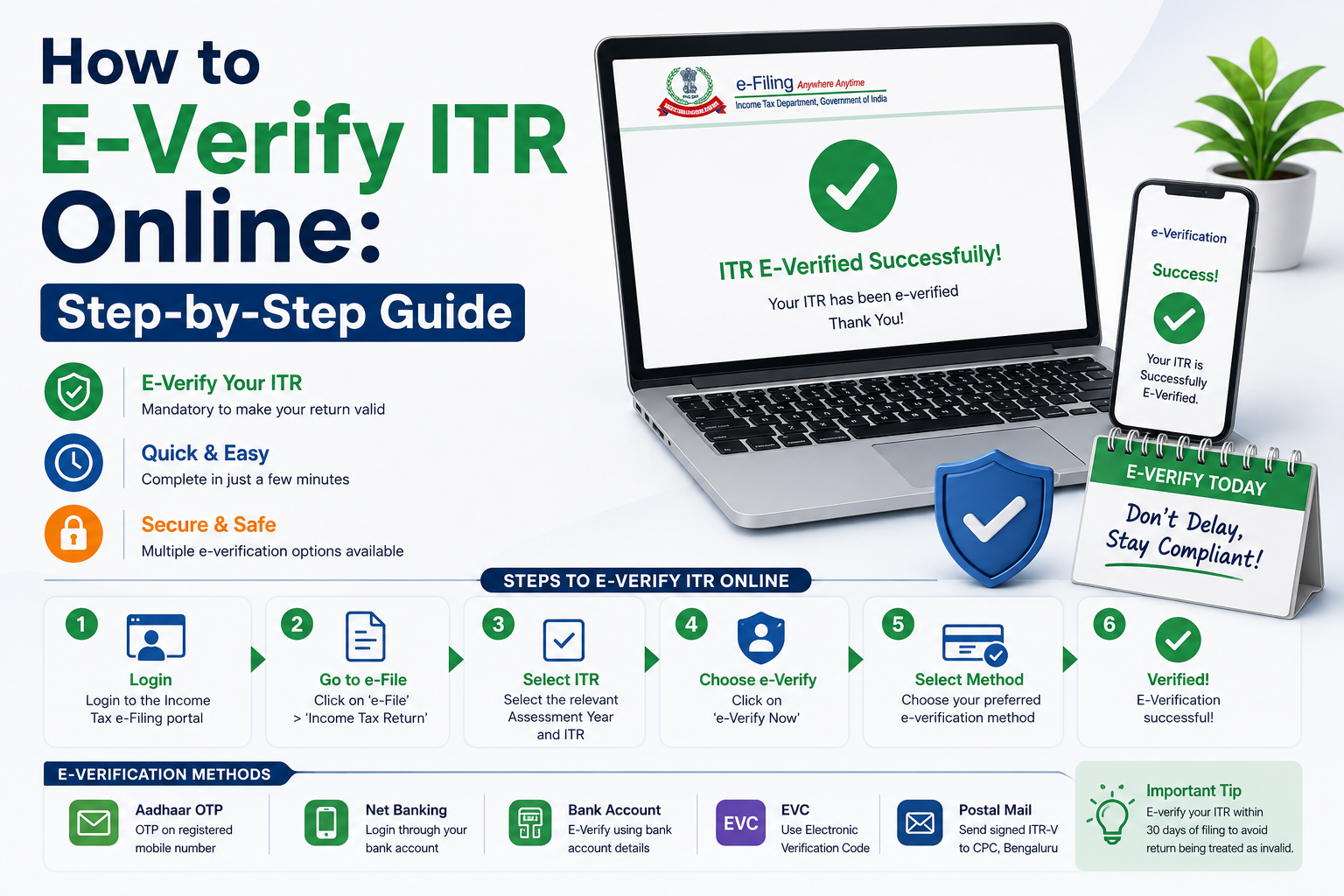
How to E-Verify ITR Online
An income tax return can be e-verified via the Income Tax e-Filing portal through the following process:
Step 1: Go to the Income Tax e-Filing Portal
Log in to the official Income Tax e-Filing portal and access the e-Verify service.
Step 2: Log in to Your Account
Login into the portal using the registered credentials. There are different ways to log in to the portal and get authenticated, based on the taxpayer type and account.
Step 3: Choose E-Verify Return
Once logged in, go to:
e-File → Income Tax Return → e-Verify Return
Eligible unverified returns will be shown in the portal.
Step 4: Select the ITR
Select the income tax return that needs to be verified. Information such as the acknowledgment number and assessment year will be required for verification, depending on the route.
Step 5: Select an e-Verification Option
Choose from the various options for verification using any one of the e-verification options like Aadhaar OTP, EVC using a validated bank/demat account, net banking, or DSC.
Step 6: Perform the Authentication Process
Proceed to perform authentication using the OTP, EVC, or DSC authentication process.
Step 7: Verify the ITR
When authentication is completed successfully, a verification message for successful e-verification of ITR is displayed on the website.
Methods to E-Verify Your ITR
There are various options available for the ITR verification process online through the Income Tax Department website.
Aadhaar OTP
A taxpayer who is eligible to do so can verify his/her return using the OTP received through the mobile number registered with Aadhaar. The Aadhaar and PAN conditions as per the taxpayer are to be fulfilled.
Bank Account EVC
The Electronic Verification Code (EVC) can be generated through an eligible pre-validated bank account.
Demat Account EVC
The taxpayers with an eligible pre-validated demat account can use EVC from the same account.
Net Banking
The eligible taxpayers can opt for the net banking process using an eligible bank participating in the e-Filing process.
Digital Signature Certificate
The Digital Signature Certificate (DSC) can be used for e-verification. DSC verification process may be compulsory for some forms or categories of taxpayers.
The Income Tax Department has also mentioned the offline method for EVC through ATM. The availability of the facility needs to be checked on the portal.
How to E-Verify ITR Using Aadhaar OTP
Aadhaar OTP is one of the frequently employed means to authenticate ITR through Aadhaar.
- Choose Aadhaar OTP as the mode of authentication.
- Follow the steps for Aadhaar authentication on the portal.
- Get the OTP.
- Enter the OTP in 6 digits.
- Submit the OTP.
- Verify the confirmation message that shows your success in authentication.
As per the Income Tax Department, the OTP is valid only for 15 minutes with three chances to enter the OTP correctly.
How Long Do You Have to E-Verify Your ITR?
As far as the returns filed in accordance with the existing regulations are concerned, the verification time would normally be 30 days from the uploading of the return on the particular date.
The Department of Income Tax has changed the existing limit of 120 days to 30 days from 1 April 2024 onwards.
When the verification of the return is done after the lapse of 30 days, a condonation of delay application would be required.
This aspect is specifically catered to in the existing e-verify process.
Filing of the return could also be affected due to the delay in verification.
What Happens If You Do Not E-Verify Your ITR?
An ITR that is uploaded but not verified cannot be treated as a valid return in the usual way. It may have an impact on the processing of the return as well as the refund linked to it.
If the deadline of 30 days for verification of the return has already passed, the taxpayer has to apply for condonation of his action.
How to Check ITR E-Verification Status Online
Once the process of verification is complete, you can use the Income Tax e-Filing portal to confirm your ITR verification status.
Log in to the portal and view your filed returns/ITR status. Confirm whether the status is a verified return or whether it still needs to be verified. Make sure you have all the information relating to your PAN, assessment year, etc., ready just in case.
If the status is still pending, confirm whether the process of verification is complete or not.
What Is ITR-V and Is It Still Required?
ITR-V is the acknowledgment form that serves the purpose of verifying the Income Tax Return manually.
A taxpayer who has been able to verify his tax return electronically is not required to submit a paper ITR-V simply because he has submitted his tax return. Manual verification through the submission of ITR-V is an alternate route when e-verification has not taken place.
As per instructions from the Income Tax Department, the verified ITR-V is required to be sent to the Central Processing Centre in Bengaluru.
Common Problems During ITR E-Verification
Common problems are:
- Not getting Aadhaar OTP
- Problem with linking PAN with Aadhaar
- Mismatch of mobile number
- Problem with pre-verified bank account
- EVC expiry
- Wrong details in the Acknowledgement form
- Issues related to Demat Account verification
- Technical issue with e-filing portal
If one process fails, try if another method can be used for verification or not.
Tips to Complete ITR E-Verification Successfully
- Get your ITR verified immediately after filing.
- Your registered mobile number should be easily available.
- Ensure that your Aadhaar/PAN is linked appropriately wherever required.
- Pre-verify your bank/demat account if you plan to use EVC.
- Have your acknowledgment number ready.
- Store your successful verification receipt.
- Find out the status of your ITR after verification.
Conclusion
e-Verification of your ITR is a very crucial stage after filing your tax return online. The procedure is relatively simple and can be done via Aadhaar OTP, eVC from bank or demat account, net banking or digital signature certificate, based on your eligibility.
In case of returns under the existing provisions, it is advisable to complete the process of e-verification within 30 days from the date of upload of the ITR to avoid any problems resulting from the delayed verification. In case the time limit for verification has already been crossed, the IT Department offers a mechanism for condonation of delay.
Always make sure to check the status of your ITR after e-verification and retain proof of the same